Your biggest Google Ads competitor may not be the business you’re watching

Your biggest Google Ads competitor may not be the business you’re watching
 Najam Ahmed
 Ask a clinic owner in Dubai who their competitors are, and you’ll hear the names of two clinics down the road. Then open their Auction Insights report. The domain winning the most auctions against them is often one they’ve never considered: a chain from another emirate, a booking platform, or a practice that opened last quarter. Google Ads already tells you who competes with you for clicks, and most businesses never look. This post covers where to find that data, how to read it, and what to do with it.
The Short Answer: Your Google Ads competitors are the advertisers in the same auctions as you, and Auction Insights names them. Add the Ads Transparency Center to see their ads, Keyword Planner to see the keywords their website targets, and AI research for the public signals in between.
Your street rival isn’t always your auction rival
In the UAE, the auction often looks different from the street. A Dubai clinic can lose clicks to a Sharjah group bidding on “near me” searches, and an Abu Dhabi dental practice may compete with booking platforms more than with other dentists. Paid tools such as SEMrush and SpyFu rely mostly on US and European data and see little of this market. For UAE businesses, your own account data is the most reliable source you have.
Auction Insights: the competitor list Google already gives you
Auction Insights compares your ads with every advertiser that entered the same auctions. Google offers it for Search, Shopping and Performance Max campaigns once they pass a minimum activity threshold. To open it:
- Go to Campaigns, Ad groups or Keywords and select the ones you want to check.
- Click Auction insights in the page menu.
- Set a date range of 30 to 90 days. Shorter periods swing too much to read.
For Performance Max, the report works at campaign level and splits results between Search and Shopping. If one campaign covers several emirates, split it by location first, because a combined report can hide a rival that only bids in Abu Dhabi.
The six numbers, in plain words
Each competitor domain gets one row. Owners need to know what each figure means; practitioners need to know which combinations matter.
- Impression share: how often your ad showed out of all the times it could have.
- Overlap rate: how often a competitor appeared in the same auction as you. This is the clearest sign of who you really compete with.
- Position above rate: how often their ad sat higher than yours when both showed.
- Top of page rate: how often an ad appeared above the organic results.
- Absolute top of page rate: how often an ad took the very first position.
- Outranking share: how often you beat them, either by ranking higher or by showing when they didn’t.
Read overlap and position above together. That pairing is the core of Karooya’s 2026 guide to the report, and it matches what I see in UAE accounts: high overlap with a high position-above rate marks the rival to study first. A rival ranking above you may simply have better ads, because Ad Rank weighs quality as well as bids, as we explained in how the Google Ads auction works.
What a competitor’s move looks like
The table below is an illustrative example for a physiotherapy clinic in Dubai. The domains are invented, but the pattern is common.
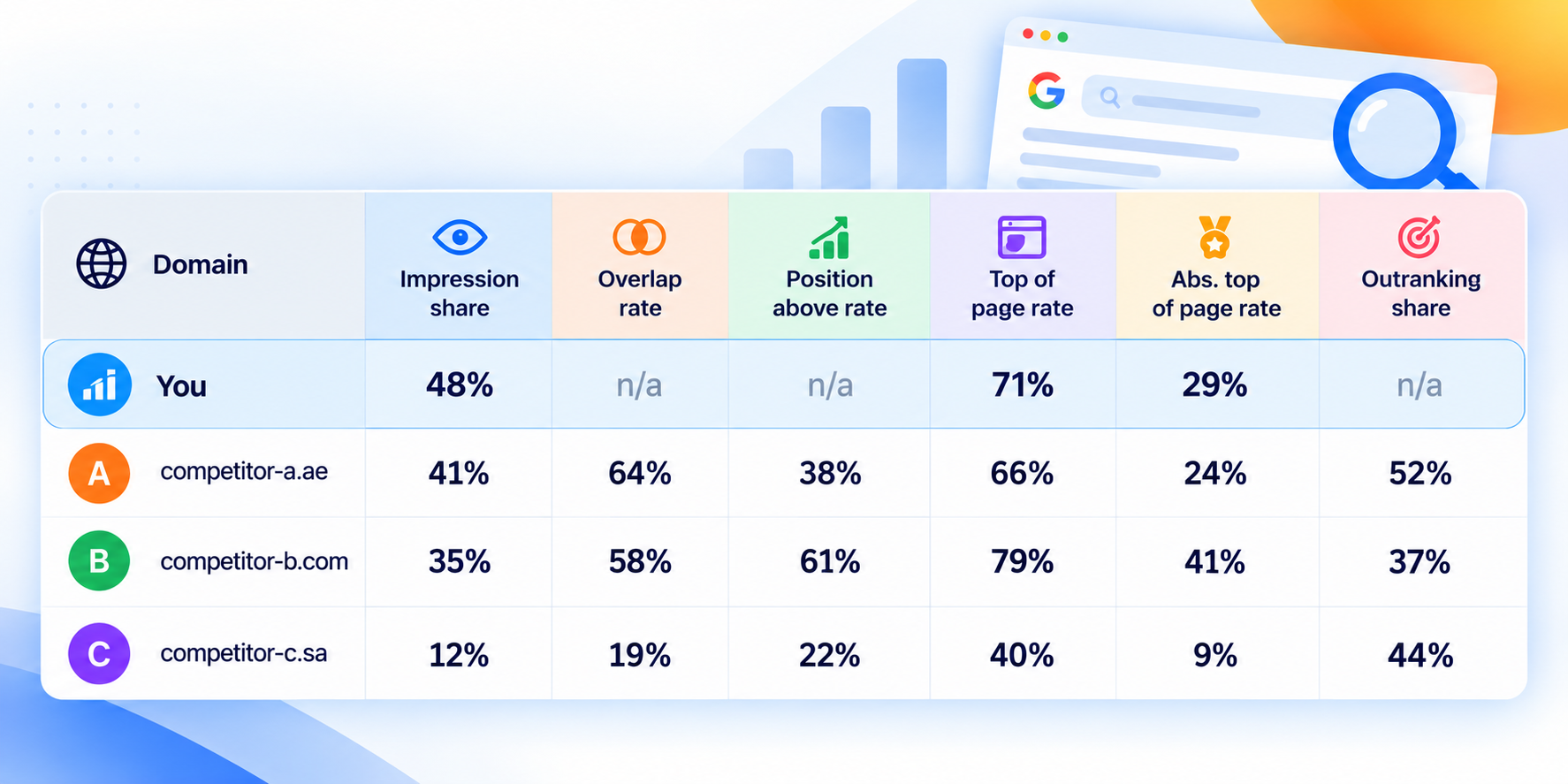
Assume competitor B’s overlap rate was 21% the month before. The rows then read like this:
- Competitor B is the one to watch. Overlap nearly tripled, and they now rank above you in most shared auctions. They have likely raised budgets, added keywords that match yours, or improved their ads.
- Competitor A is a steady rival. You meet often and split the wins roughly evenly. Check monthly.
- Competitor C is occasional. Low overlap usually means a different service focus or a small budget.
One caution before reacting. Since April 2025, Google has allowed the same advertiser to appear twice on one results page, at the top and the bottom. A rival’s impression share can rise from double-serving alone, so confirm the change in position above rate and outranking share before assuming they’ve raised bids.
Their ads, in public: the Ads Transparency Center
Auction Insights tells you who. The Ads Transparency Center shows what they run. It’s free, needs no login, and lists ads from verified advertisers across Search, YouTube and Display, as this 2026 Transparency Center guide explains. There are two ways in.
- Search a competitor’s business name or domain at adstransparency.google.com, then set the region to the United Arab Emirates and widen the date range.
- On a live search, click the three dots next to a sponsored result, open “About this advertiser,” then “See more ads.”
Note the offers, the services they push, their calls to action and how long each ad has run. An ad running for months is probably working, and a burst of new ads before Ramadan or a branch opening signals a push. The Center doesn’t show spend. Ad volume hints at investment, but no free tool reveals a competitor’s budget, and any figure that claims to is an estimate.
The keywords their website targets
Keyword Planner accepts a website as its starting point. Enter a competitor’s URL and Google returns keyword ideas based on that site, which is a fair picture of the searches it’s built to win. We covered reading those numbers in our Keyword Planner post.
- Choose “Discover new keywords,” then “Start with a website,” and enter the competitor’s URL.
- Set the location to the UAE and run it in both English and Arabic, since the two return different keywords.
- Filter for phrases containing your core service, export, and repeat for each main competitor.
- Merge the lists and remove duplicates.
Keywords that appear for every competitor but not in your account are the first gaps to close.
Filling the picture with AI research
Deep research in Claude or ChatGPT can’t see anyone’s ad spend either. What it does well is gather public signals from dozens of sources in minutes. A prompt like this works:
I run a physiotherapy clinic in Dubai Marina. Identify the main competitors for physiotherapy and sports rehab in Dubai. For each, list the services and offers they promote, new branches opened in the last 12 months, their Google review counts, and any press coverage. Cite a source for every claim and mark anything you couldn’t verify.
Look for these signals in the answer:
- New branches or service launches, which usually come with ad pushes
- Offers repeated across their website, social media and ads
- Fast review growth, which shows momentum
- Job posts for marketing roles
Check each claim against its source before acting on it. Some competitors now advertise inside ChatGPT too, which no Google report shows.
The free check anyone can do
Owners without access to the ad account can still map competitors in ten minutes. In a private browser window, search your service plus area, such as “physiotherapy clinic Dubai Marina” or “dental clinic Khalidiya Abu Dhabi,” and note who appears in three places:
- The ads at the top and bottom of the page
- The Map Pack
- The first page of organic results
A business that shows up in all three is a serious competitor. One that appears only in ads may be running a short campaign, and one that appears only on the map is winning on local SEO. Repeat the search for each emirate you target.
Learn from competitors without copying them
Once you know who you’re up against, use what you found to sharpen your own offer.
- If a rival’s long-running ads all lead with price, test leading with results or specialist credentials.
- If their landing pages answer questions yours don’t, add those answers to your own pages.
- If every competitor pushes the same package, offer something they don’t.
- Keywords only they chase may not be worth the fight.
Copying a competitor’s ad hands you their positioning, which they already own. Look for the gap they leave.
What to ask your agency
If a freelancer or agency runs your ads, you don’t need to read the report yourself. Ask them for the following each month.
- The top five competitors by overlap rate, compared with the previous month
- Any new domain that appeared, and what its ads promote
- Impression share lost to budget and to rank, with a sentence on why
- One change they made because of what competitors did
An agency that can’t answer these isn’t watching the market for you.
Ramadan, Abu Dhabi-only rivals and the five-percent newcomer
Global guides miss three things that matter in UAE accounts.
- Compare Ramadan with last Ramadan, not with the month before. Overlap and impression share swing hard around Ramadan, Eid and the summer months.
- Run separate reports for each emirate you target. A rival bidding only in Abu Dhabi or Sharjah vanishes in a combined view.
- Watch small newcomers. A domain at 5% overlap this month can be your main rival next quarter, especially in aesthetics and wellness.
We teach competitor research as part of keyword research in our Google Ads, AI and GA4 course. For a second opinion on your own Auction Insights, see our Google Ads consulting or message me on WhatsApp.